

Goal Setting November 10, 2026
Productivity and Success: Why Busy Isn't Getting You Ahead
Working harder isn't working. Learn the three hidden failure points—direction, action, feedback—that separate busy effort from real success.
Goal Setting 15 min read
We tested 10 vision board apps for 2026. See which ones actually turn pictures into daily action, not just a pretty screensaver you forget.
Most vision board apps are photo albums that make you feel productive for a week. You drag in pictures of a beach house and six-pack abs. You get a dopamine hit. Then the app lives untouched on page three of your phone. That’s the real problem nobody admits out loud.
Here’s the short version: Canva wins for free design. Milanote works best for creative mood boards. Vision Board ++ leads for daily affirmations. Compass inside Zorga is the only one built so your vision actually drives what you do Tuesday. Below I break down all 10 apps worth your time, when to use each one, and why most vision boards fail within weeks.
A vision board app collects images, words, and goals into one visual space that represents where you want your life to go. That’s different from a photo collage app, which just arranges pictures with no goal structure, and different from a task manager, which tracks what you’re doing but never starts with the big picture of why.
The good ones do three things: let you create something visual fast, connect that visual to specific goals, and give you a reason to come back. Most apps do only the first one.
I’ve used dozens of these apps. The pattern never changes. You spend an hour finding perfect stock photos. You feel inspired. Then life happens, the app gathers dust, and the board becomes a screenshot you forgot existed.
This isn’t a motivation problem. It’s a design flaw. Psychologists studying goal visualization, including researchers on “mental contrasting,” found that imagining a desired future only works when paired with a concrete plan to get there. Simply picturing success without naming obstacles and next steps can actually make people less likely to act, according to research from the American Psychological Association. A vision board that shows only the destination, with no route, works against you.
Research on “implementation intentions” by psychologist Peter Gollwitzer shows people follow through far more when they specify exactly when, where, and how they’ll act, not just what they want. As summarized by the Association for Psychological Science, a vision board without a plan is a wish. A vision board with a plan is a strategy.
Check three things:
| App | Platform | Price | Best For | What It Does |
|---|---|---|---|---|
| Compass (Zorga) | iOS, Android, Web | Free to start, paid for full system | Connecting vision to daily action | Links your vision board directly to a Daily Action Plan and Weekly Review |
| Canva | Web, iOS, Android | Free, Pro $12.99/mo | Free drag-and-drop design | Huge template and stock photo library |
| Milanote | Web, iOS, Android | Free tier, paid from $12.50/mo | Creative mood boards | Flexible boards for notes, images, and links together |
| Vision Board ++ | iOS only | Free with subscription from $2.99/mo | Daily affirmations and manifestation | AI-generated affirmations and voice recordings |
| Notion | Web, iOS, Android | Free for individuals, paid from $10/mo | Database-style vision boards | Combine images, goals, and trackers in one workspace |
| Storyflow | iOS, Android | Free with in-app purchases | Vision-plus-action boards | Pairs visuals with habit and goal tracking |
| LoA App | iOS, Android | Free with subscription options | Daily manifestation practice | Reminders and affirmation streaks |
| Visuapp | iOS, Android | Free with in-app purchases | Static collage design | Simple, fast photo collage layouts |
| Web, iOS, Android | Free | Collecting inspiration | Massive, searchable image library | |
| MoodBoard | Google Play | Free with ads, paid to remove | Simple mobile vision boards | Lightweight, no-frills board builder |
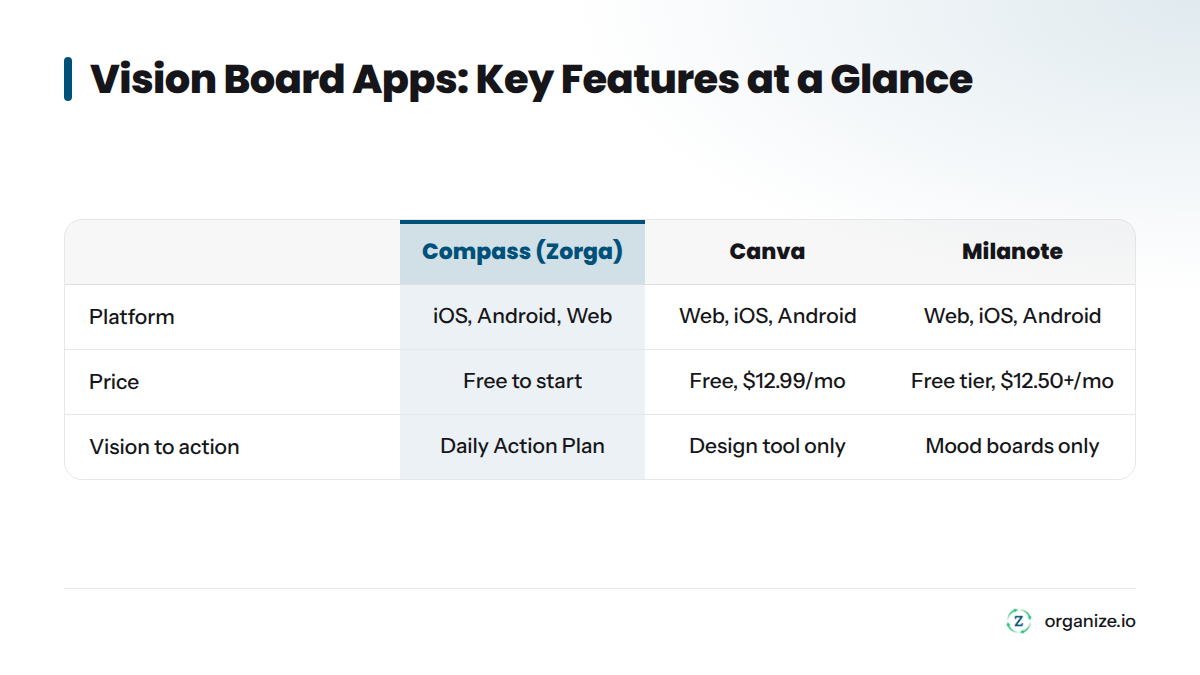
Notice the pattern: everything left of Compass is strong at the picture part. Only Compass answers “I made this board. Now what do I actually do today?”
Canva is the first result most people find, and for reason. It’s free, runs in your browser or on your phone, and has hundreds of vision board templates for wallpapers, printables, and social posts.
Platform: Web, iOS, Android | Price: Free, Canva Pro from $12.99/month | Best for: Anyone who wants total design freedom at no cost | Standout feature: Enormous library of templates and stock photography
The catch: Canva is a design tool, not a goal-setting tool. It won’t ask what you’re trying to achieve or remind you to check in. Follow-through is on you.
Milanote works like a digital corkboard. You can pin images, sticky notes, links, and to-do lists on the same canvas, making it popular with designers, writers, and creative directors building out a concept rather than a personal goal.
Platform: Web, iOS, Android | Price: Free tier available, paid plans from $12.50/month | Best for: Creative professionals building mood boards | Standout feature: Freeform boards that mix text, images, and links
This handles creative project mood boarding better than almost anything else on this list.
Vision Board ++ by Hero21 is the most feature-packed manifestation app available. It includes AI-generated affirmations, voice recording so you hear your own voice reading goals back to you, home screen widgets, and a gratitude journal. It holds a 4.9-star rating from more than 3,000 App Store reviews.
Platform: iOS only | Price: Free with subscription tiers | Best for: People who want a daily manifestation ritual | Standout feature: AI affirmations paired with voice recordings and “Magic Movies”
Fair warning: iOS only. The subscription pricing structure confuses some users. It’s also entirely affirmation-focused with no connection to measurable goals or daily tasks.
Notion isn’t built as a vision board app, but productivity-minded people build one using its flexible pages and databases. You can combine an image gallery with a goals tracker, habit log, and notes, all linked together.
Platform: Web, iOS, Android, desktop | Price: Free for individuals, paid plans from $10/month | Best for: People already living in Notion | Standout feature: Fully customizable databases that link images to goals and tasks
The downside: setup time. There’s no built-in vision board template, so you either build from scratch or download a community template and hope it fits your workflow.
Storyflow tries to bridge the gap between a pretty board and an actual plan. It lets you build a visual board and pair it with habit tracking, which is closer to what most people actually need.
Platform: iOS, Android | Price: Free with in-app purchases | Best for: People who want visuals and basic habit tracking in one app | Standout feature: Visual boards tied to daily habit check-ins
It’s a step forward compared to pure collage apps, though the goal-setting structure is lighter than a dedicated system like Compass.
Law of Attraction apps are built around daily reminders and affirmation streaks. They’re lightweight, simple, and designed to nudge you to check in once a day.
Platform: iOS, Android | Price: Free with subscription options | Best for: People who want a quick daily manifestation habit | Standout feature: Reminder notifications and affirmation streaks
These work well as a daily nudge, but don’t expect real goal-tracking depth. They’re built for ritual, not planning.
Visuapp keeps it simple. It’s a straightforward photo collage builder with vision board templates, good for someone who wants a clean result fast without learning a new tool.
Platform: iOS, Android | Price: Free with in-app purchases | Best for: Quick, simple collage-style boards | Standout feature: Fast templated layouts with minimal learning curve
If your only goal is a nice-looking image for your lock screen, this gets it done. It won’t do anything beyond that.
Pinterest is not technically a vision board app, but its boards feature works like one, and the search engine is unmatched for finding images that match a feeling or theme.
Platform: Web, iOS, Android | Price: Free | Best for: Gathering inspiration before you build elsewhere | Standout feature: Massive, searchable image library with a recommendation algorithm
Think of Pinterest as the research phase, not the finished product. Most people collect pins here, then move the best ones into Canva or Milanote to build the actual board.
For Android users who want something dead simple, MoodBoard on Google Play offers a no-frills way to build a photo-based board directly on your phone, no account or web dashboard required.
Platform: Google Play (Android) | Price: Free with ads, one-time purchase to remove ads | Best for: Android users who want a lightweight mobile-only option | Standout feature: Fast, minimal interface built for phone-only use
It won’t win design awards, but it solves the “I just want to make this on my phone in ten minutes” problem directly.
Compass, the vision board and goal-setting tool inside Zorga, is built differently from everything else on this list. It doesn’t start with a blank canvas and photo library. It starts by asking what you actually want your life to look like across the areas that matter: career, health, relationships, finances, personal growth. Then it turns that vision into real goals.
Platform: iOS, Android, Web | Price: Free to start, paid plans for the full system | Best for: People tired of making a vision board that goes nowhere | Standout feature: Your vision feeds directly into a Daily Action Plan and Weekly Review, so the board isn’t a dead end
Here’s the difference in plain terms. Vision Board ++ gives you an affirmation to read. Canva gives you a pretty picture. Compass gives you both a picture of where you’re headed and a daily structure that keeps pulling you toward it. Focus Sessions, a Weekly Review, and an AI Coach all work together so the board is the starting point of a system, not the whole system. To see how it works, explore the Zorga app.
Here’s the honest answer: most people don’t need to pay for a vision board app. They need to pay for a system that keeps them accountable to it.
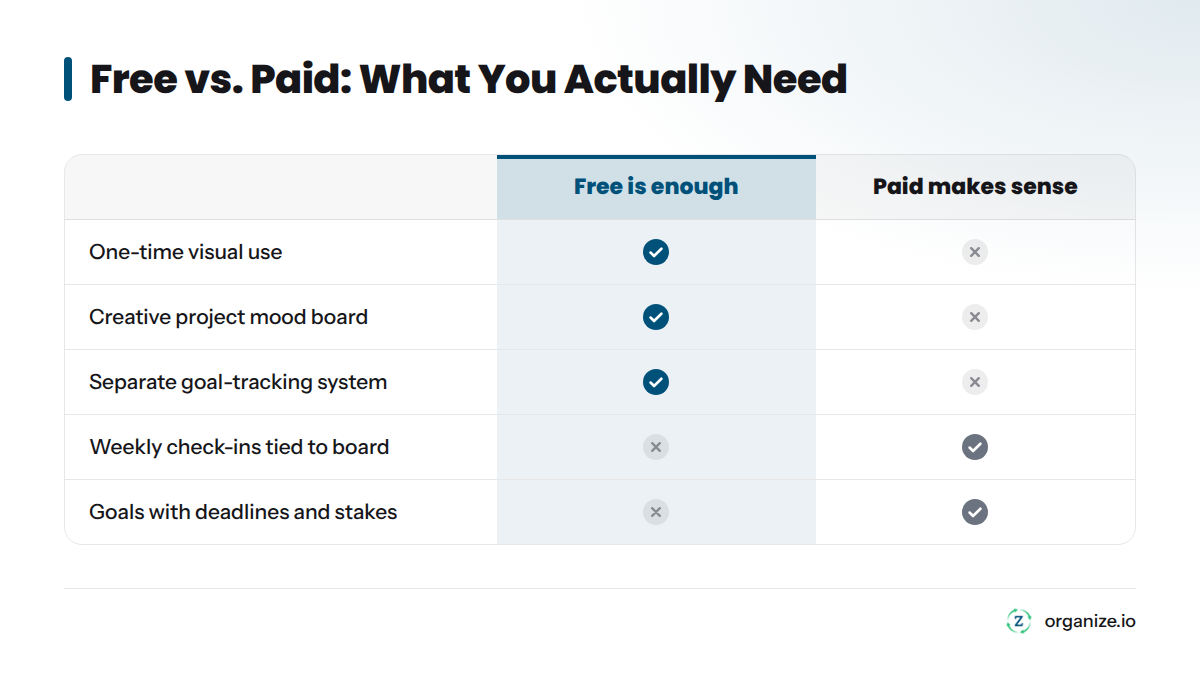
Free is enough if:
Paid makes sense if:
If you fall into that second list, a free collage app isn’t the gap. The gap is a system. That’s a different conversation than “which app has the nicest templates.” Read why productivity apps fail when you lack direction before you download another one.
Visualization alone rarely changes behavior. The $2.99 subscription apps don’t want to tell you this because it’s bad for sales. Looking at pictures of a goal, on its own, does very little. The psychological research is clear: people follow through when they specify exactly when, where, and how they’ll act. Not just what they want. A vision board without a plan is a wish. A vision board paired with a plan is a strategy.
I’ve watched this pattern repeat for years. Someone builds a gorgeous board in January. They feel genuinely motivated. By March, the app hasn’t been opened in six weeks, and the goals on that board are no closer than the day it was made. The board wasn’t the problem. The missing bridge between “I want this” and “here’s what I do Tuesday” was the problem.
Here’s a three-step framework you can run with any app on this list. Compass builds this directly into the product so you’re not stitching it together by hand.
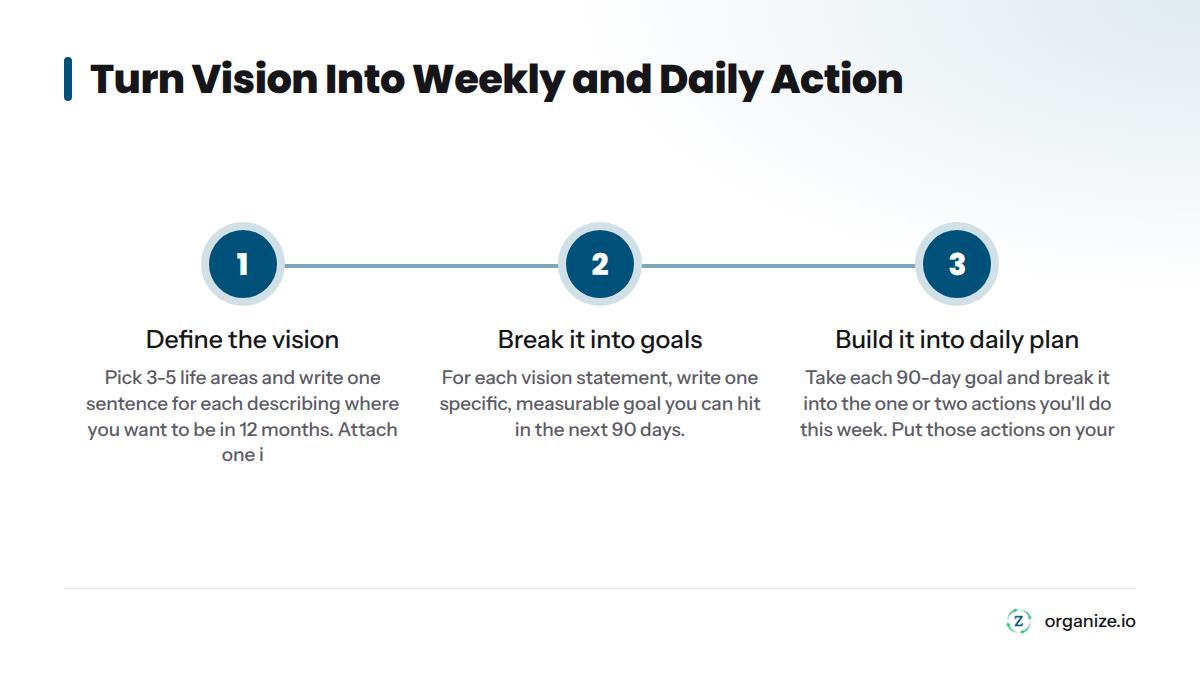
Step 1: Define the vision. Pick 3-5 life areas (career, health, relationships, finances, personal growth) and write one clear sentence for each describing where you want to be in 12 months. Attach one image per area that represents it.
Step 2: Break it into goals. For each vision statement, write one specific, measurable goal you can hit in the next 90 days. “Be healthier” becomes “run a 5K by January 15.”
Step 3: Build it into a daily plan. Take each 90-day goal and break it into the one or two actions you’ll do this week to move it forward. Put those actions on your calendar or your Daily Action Plan, not just in your head.
Run this loop weekly. A Weekly Review, checking what moved and what didn’t, is what keeps the board from becoming wallpaper. For a deeper breakdown of turning big goals into daily steps, turn your goals into a real action plan walks through the process in detail.
Here’s a video showing one practical way to build a goal-driven vision board using layout and planning techniques you can apply in almost any app on this list:
That last group is most people, if they’re honest. A pretty board is easy. A board that changes your Tuesday is the hard part, and it’s the part worth paying attention to. For more on how goal-tracking apps compare for this exact problem, see our review of the best goal tracking apps.
Yes, you can do this on your phone in under 20 minutes. Here’s the process:
That last step is what separates a board that works from one that becomes a screenshot you forget about.
What is the best free vision board app?
Canva is the best free vision board app for most people because it combines a true drag-and-drop editor, hundreds of templates, and a massive stock photo library at no cost. Pinterest is a strong free alternative if you’re still gathering inspiration rather than building a finished board.
Can ChatGPT make a vision board?
ChatGPT can’t generate a finished visual board on its own, but it can help with the planning behind one. You can ask it to help brainstorm goal categories, write affirmation phrases, or suggest image search terms, then bring that material into a visual tool like Canva, Milanote, or Compass to build the board. Some AI image generators can create individual images, but you’ll still need a separate app to arrange them.
Can I do a vision board on my phone?
Yes. Every app on this list, including Canva, Milanote, Vision Board ++, Pinterest, and Compass, has a mobile app for iOS, Android, or both. You can build a full vision board on your phone in 15-20 minutes using the step-by-step process above, no desktop required.
Where can I create a vision board for free?
Canva, Pinterest, Milanote’s free tier, and Notion’s free plan all let you build a vision board at no cost. Compass also offers a free starting tier if you want your board connected to a goal-setting system rather than standing alone.
Do vision boards actually work?
Vision boards work as a clarity tool, but research on goal visualization shows that imagining an outcome alone has limited effect on behavior without a concrete plan attached. According to goal-setting research from the American Psychological Association, specific and measurable goals paired with a plan consistently outperform vague wishes or pure visualization. A vision board works best as the first step in a system, not the whole system.
How often should I update my vision board?
Review your vision board weekly and update it fully every 90 days as your goals shift. A quick weekly glance keeps it active in your mind, while a full refresh every quarter keeps the content relevant to what you’re actually working toward now, not what you wanted six months ago.
If all you want is a nice picture to look at, Canva or Pinterest will get you there for free in an afternoon. If you want a daily affirmation habit, Vision Board ++ does that well. But if you’ve made boards before and watched them fade into the background within a month, the app isn’t your problem. The missing link between vision and action is.
That’s the exact gap Zorga’s personal effectiveness system was built to close. Compass starts with your vision, same as any board, but it doesn’t stop there. It turns that vision into goals, breaks those goals into a Daily Action Plan, and uses a Weekly Review to keep you honest about what actually moved. For the fullest comparison of options in this category, see our full roundup of the best vision board apps.
Pick the tool that matches what you actually need right now. Just don’t confuse a pretty picture with a plan.
Goal Setting November 10, 2026
Working harder isn't working. Learn the three hidden failure points—direction, action, feedback—that separate busy effort from real success.
Goal Setting November 7, 2026
Stop reacting to your inbox. Learn the 3-step method to set direction, pick one priority, and protect a focus block that actually moves goals forward.
Goal Setting November 1, 2026
Willpower runs out, but systems don't. Learn the 4-pillar framework behind productivity tips that hold up under real pressure, not just in January.