

Goal Setting November 10, 2026
Productivity and Success: Why Busy Isn't Getting You Ahead
Working harder isn't working. Learn the three hidden failure points—direction, action, feedback—that separate busy effort from real success.
Goal Setting 12 min read
Willpower runs out, but systems don't. Learn the 4-pillar framework behind productivity tips that hold up under real pressure, not just in January.
Productivity tips don’t fail because they’re bad. They fail because you tried to run them without knowing what you were actually working toward.
That’s the gap most productivity advice never addresses. A tight to-do list or time blocking works when it serves a clear goal. Without one, even great tactics burn out in a few weeks. The tactic isn’t the problem. Direction is.
I built and later exited a company that made the INC 5000 list. I tested nearly every productivity hack in this article in real conditions - with a team depending on me and no patience for anything that didn’t hold up under pressure. Some survived years. Others died in a month. This tells you which is which, and why.
Motivation isn’t a personality trait. It’s a resource, and like money or time, it gets spent. You feel it in the third quarter of a hard year, after a bad night of sleep, after back-to-back fires at work. The tip didn’t change. Your fuel did.
Willpower works the same way. Research by Stanford psychologist Roy Baumeister on ego depletion found that self-control draws from a limited pool that depletes throughout the day - which explains why disciplined habits fall apart Thursday afternoon even though they felt easy Monday morning. Tips that depend entirely on willpower - “just focus harder,” “stop checking your phone” - are the first to collapse once fatigue sets in.
Here’s what nobody tells you: when a productivity tip stops working, the tactic is rarely the problem. The real issue is missing direction. A to-do list with twenty items feels productive for a week, then turns into noise. Nobody told the list which three items actually move your quarter forward. A time-blocked calendar looks disciplined until the first crisis hits - because those blocks were never ranked against a bigger goal.
Tactic versus System: A tactic is a single move - batching email, using a timer. A system is the set of decisions that tells your tactics what to prioritize when things get hard. Tactics without a system are just motion. A system without tactics never ships. You need both, but you need the system first.
Every productivity tip answers one of four questions. Most lists never organize them this way, which is why you end up cherry-picking random advice that doesn’t connect.
Sort tips into four pillars: Direction, Priority, Execution, and Review. Each builds on the one before it.
| Pillar | What It Answers | Example Tip |
|---|---|---|
| Direction | What actually matters right now? | Write one sentence defining what winning looks like this quarter |
| Priority | Out of everything on my plate, what do I do first? | Pick the one task that would make today a win before opening email |
| Execution | How do I protect the time to do the work? | Block time on the calendar and treat it like a meeting you cannot cancel |
| Review | Am I actually staying honest with myself? | Run a five-minute review every Friday |
Time blocking, the Pomodoro Technique, and the Eisenhower Matrix all fit inside this structure. The point here is understanding where each tip belongs and what breaks it.
Direction tips come first because everything downstream depends on them. Skip this pillar and the rest is just busywork with better scheduling.
Tip 1: Write one sentence defining what winning looks like this quarter.
Not a task list. An outcome. Write the actual result you’re chasing over the next three months.
Tip 2: Review your reason for the work weekly, not just your tasks.
Most people review their calendar every week. Almost nobody reviews why the calendar looks that way. That gap is where you lose focus.
Tip 3: Say no to tasks that don’t serve your stated direction.
This sounds obvious. It’s brutally hard in practice, especially if you manage people or run a business.
I ran without a real direction statement for two years while scaling my team. I had revenue targets, but no sentence telling me what to say no to. I said yes to everything that looked like opportunity, and it nearly wrecked focus. Once I forced myself to write one sentence down before touching a task list, the noise stopped.
Once direction is set, priority tips tell you what to do first out of everything competing for attention.
Tip 4: Pick the one task that would make today a win, before opening email.
Decide this before Slack, your inbox, or your calendar get a vote. Those three things always have an opinion about what matters, and it’s usually wrong.
Tip 5: Sort tasks with the Eisenhower Matrix.
Splitting tasks into urgent, important, both, or neither is a fast way to see what deserves energy. It works best after you already know your bigger goal, because “important” has a real meaning only then.
Tip 6: Batch low-value tasks into a single block instead of scattering them.
Small tasks like expense reports or routine replies eat your day in pieces. Batch them into one window.
Execution tips protect the hours you already decided matter. This is where most generic advice lives, and where most people give up first - usually because they skipped the two pillars above.
Tip 7: Time blocking.
Put your priority task directly on the calendar as a named block, not a vague “focus time” placeholder.
Tip 8: Use focus sessions for longer stretches of single-task work.
Protected blocks of single-task time beat multitasking almost every time.
Tip 9: Set a visible deadline, even for tasks with no external one.
Work expands to fill the time you give it. A task with no deadline becomes a task with no urgency.
If motivation keeps collapsing at the execution stage, that’s often a sign you need structure for staying focused at work rather than another willpower trick.
Review is the pillar every competitor list skips, and it’s the one that makes the other three durable over months instead of days.
Tip 10: Run a five-minute weekly review every Friday.
Look at what you planned, what you actually did, and what pulled you off course. Five minutes is enough if you do it every week.
Tip 11: Track what you abandoned, not just what you finished.
Most reviews only count completed tasks. The tasks you dropped tell you more about what’s actually broken in your priorities.
Tip 12: Ask what pattern caused last week’s missed priorities.
One missed priority is an accident. Three weeks of the same missed priority is a pattern worth fixing at the direction level, not the task level.
Watch for these signs that a productivity tip has stopped working:
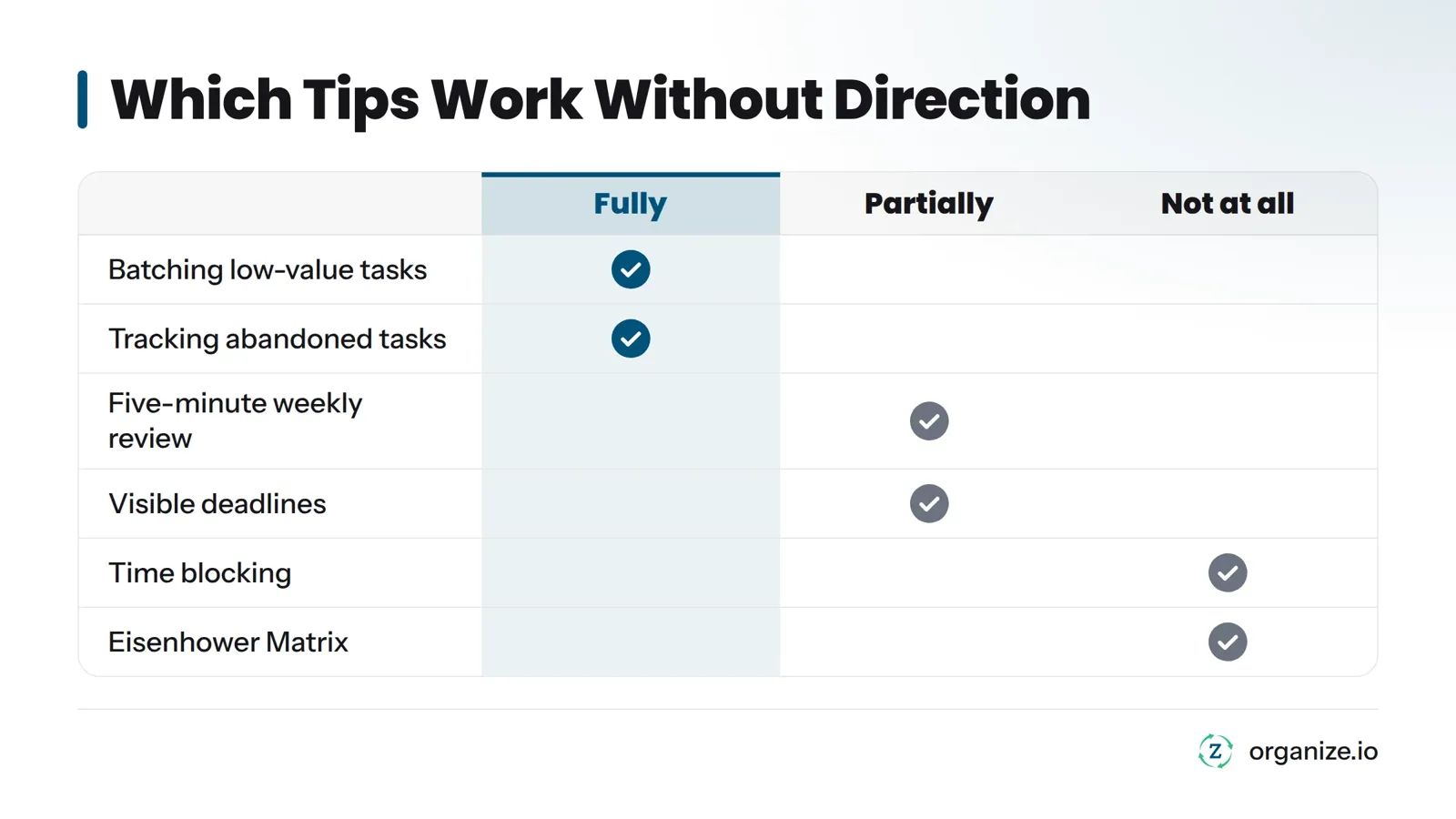
Some tips work on their own. Most don’t. Here’s the honest breakdown, based on what actually held up when I was running a company with zero patience for advice that didn’t work under real pressure.
| Tip | Works Without Direction? | Why |
|---|---|---|
| Five-minute weekly review | Partially | Helps you notice patterns, but without direction you’re reviewing against nothing |
| Time blocking | No | Protects time for the wrong tasks just as easily as the right ones |
| Eisenhower Matrix | No | “Important” has no real meaning without a stated goal to measure against |
| Batching low-value tasks | Yes | This is pure efficiency; direction barely changes it |
| Visible deadlines | Partially | Creates urgency, but can push you to finish the wrong thing quickly |
| Saying no to off-direction tasks | No | This tip literally requires direction to function at all |
| Tracking abandoned tasks | Yes | Useful diagnostic information even if your direction is still fuzzy |
The to-do list is the clearest example from my own experience. When I scaled my team past a dozen people, I ran a long daily to-do list for years. It fell apart within two weeks of a product launch - not because the list format was wrong, but because every item looked equally urgent with no direction statement ranking them. I switched to picking one priority task before touching the list at all. That single change did more than any app or book I’d tried.
A list of tips, even a good one, is just inputs. A system is what decides which input matters this week, this day, this hour. That’s the actual gap between people who read about productivity tips and people who stay productive for years.
Start small: write your one-sentence direction for the quarter. Tomorrow morning, before opening anything, pick your single priority task. Block one focus session for it. Review your week in five minutes this Friday. Repeat that loop. That’s a system. One tip repeated without the others is just a habit waiting to break.
The Zorga personal productivity system walks direction, priority, execution, and review as one connected flow instead of four separate decisions you have to remember to make. The Compass is where you write that one-sentence direction and store your longer-term vision. The Daily Action Plan pulls from that direction to guide what you pick first each day. Focus Sessions protect the time. The Weekly Review catches patterns. The AI Coach learns your goals and helps adjust when you’re drifting.
If you’re deciding whether tactics or systems are your actual problem, start with one free cycle: set your direction using the Compass template, pick your priority tomorrow, and run one Weekly Review this Friday. The Zorga free 5-day action plan walks you through all three, so you’re not guessing which productivity tip to start with first.
What are the best productivity tips for busy professionals?
Tips that hold up for busy professionals are the ones tied to clear direction: naming what winning looks like this quarter, picking one priority task before checking email, protecting time for that task, and reviewing your week honestly every Friday. Tips without that anchor tend to work for a few weeks, then quietly disappear.
Why do productivity tips stop working after a few weeks?
Most productivity tips stop working because motivation and willpower are limited resources that run out under fatigue and busy weeks - not because the tactic itself is flawed. The tip usually fails because it was never connected to clear direction telling it what to prioritize when things get hard.
What’s the difference between a productivity tip and a productivity system?
A tip is a single tactic, like time blocking or batching tasks. A system is the ongoing set of decisions - direction, priority, execution, and review - that tells your tactics what to focus on each week. Tips are inputs. A system is what makes those inputs durable.
How do I know which daily productivity tips are right for my situation?
Check which pillar you’re missing. If you feel busy but unclear on what matters, you have a direction problem. If you know what matters but can’t choose what to do first, you have a priority problem. If you know what to do but can’t protect the time, that’s execution. If you keep repeating the same mistakes, you’re skipping review.
What is direction-first productivity?
Direction-first productivity means setting a clear statement of what matters before choosing tactics, tools, or schedules. Instead of starting with a to-do list or an app, you start by defining the outcome you’re working toward, then build your priorities, execution, and review around that outcome.
What role does a weekly review play in staying productive?
A weekly review is the mechanism that keeps the other three pillars honest. Without it, you repeat the same priority mistakes without noticing a pattern. A five-minute review focused on what you finished, what you abandoned, and why catches problems before they become months-long habits.
How do burnout and willpower limits affect which productivity hacks work?
Tips that rely purely on willpower - forcing focus through sheer discipline - collapse first under fatigue, since self-control is a limited resource. Tips that rely on structure instead of discipline - like a visible deadline or a pre-committed focus block - survive longer because they don’t depend on how much willpower you have left that day. Research from the American Psychological Association on self-control backs this up.
How many tasks should be on a daily to-do list?
Keep the working list short enough that you can name the single most important task without thinking. Many professionals find that naming one priority task before opening email, then letting three to five supporting tasks fill the rest of the day, works better than a long undifferentiated list that treats everything as equally urgent.
Related: how to be more productive, staying focused for longer stretches
Goal Setting November 10, 2026
Working harder isn't working. Learn the three hidden failure points—direction, action, feedback—that separate busy effort from real success.
Goal Setting November 7, 2026
Stop reacting to your inbox. Learn the 3-step method to set direction, pick one priority, and protect a focus block that actually moves goals forward.

Goal Setting October 26, 2026
What is personal growth, really? Discover its true meaning, how it differs from self-improvement, and the five key areas to focus on in 2026.