
Goal Setting November 10, 2026
Productivity and Success: Why Busy Isn't Getting You Ahead
Working harder isn't working. Learn the three hidden failure points—direction, action, feedback—that separate busy effort from real success.
Goal Setting 10 min read
Stop reacting to your inbox. Learn the 3-step method to set direction, pick one priority, and protect a focus block that actually moves goals forward.
Your phone won’t stop buzzing. Your inbox is full. Your calendar is packed. But somehow you’re behind.
Here’s the direct answer: you build focused productivity by pulling one priority from a documented direction - not from your inbox - protecting one block of time for it, and filtering every interruption against that single priority instead of reacting to whatever shows up loudest. That’s the whole method. Let’s break it down.
Focused productivity means spending your work hours on the one thing that moves your goals forward, not reacting to whatever lands in front of you. It’s not being busy.
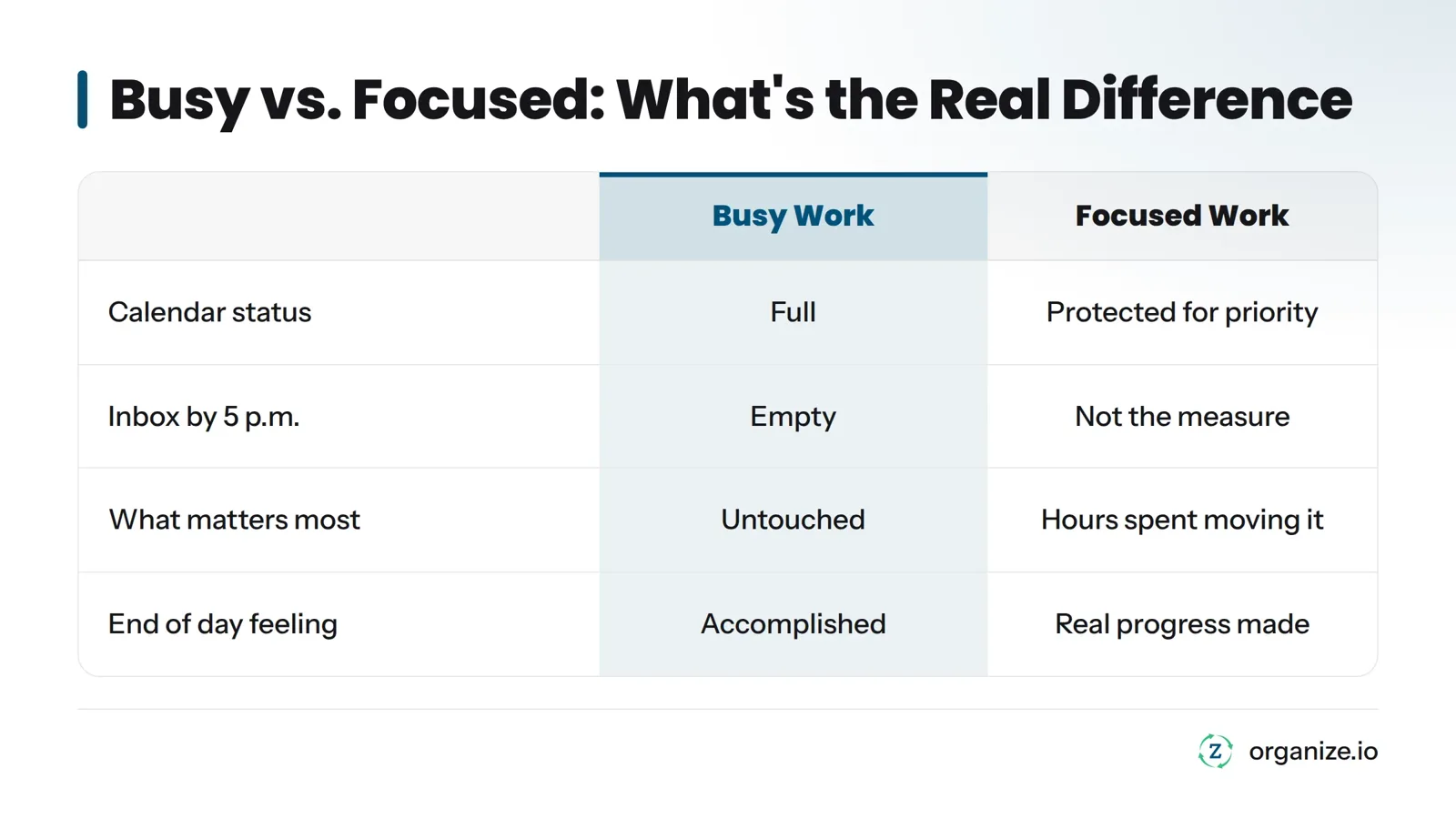
Busy means your calendar is full and your inbox is empty by 5 p.m. Focused means the hours you spent today pushed something real forward.
Most people confuse the two. You can clear 40 emails, sit through three meetings, and check off 12 small tasks, and still end the day without touching the one thing that matters most. That’s busy work wearing a productive costume.
Here’s the part almost nobody says out loud: focus is not a skill you practice in isolation. It’s what happens automatically once you know your direction. When you’re clear on where you’re headed, deciding what to work on next stops being a daily struggle. When you’re not clear, every task looks equally urgent, and your attention gets pulled in six directions before 10 a.m.
This is the core idea: focus is downstream of direction. Fix the direction problem first, and the focus problem mostly takes care of itself.
A task list tells you what needs doing. It never tells you what matters most. That’s the flaw baked into almost every to-do app on the market, which is why so many hard workers feel busy and frustrated at the same time.
Here’s how it works. When you work straight down a task list, you’re prioritizing by whatever got written down most recently, or whatever feels most urgent right now. Urgent and important are not the same thing. A client’s “quick question” email feels urgent. A Slack ping feels urgent. A calendar invite for “just 15 minutes” feels urgent. None of those automatically matter to your actual goals.
Without a filter, every interruption becomes a new top priority. Your brain re-sorts the whole list every time something new arrives. That’s exhausting, and it’s the real reason focus collapses - not a lack of willpower.
The Task List Trap: A task list is a record of loose ends, not a decision about what matters. It tells you everything you could do. It never tells you what you should do right now. Treating your task list as your priority system guarantees reactive, scattered days, because the list has no concept of importance, only existence.
Before you open your task list, know where you’re headed. That’s the order. Direction first, tasks second.
In the Zorga system, this starts with the Compass. The Compass is where you write down your actual goals and values - the stuff that defines what a good year looks like for you, not just a good day. It’s a one-time setup that you revisit, not a daily ritual.
I built and exited an INC5000 company running this exact order of operations. Every day I started with tasks instead of direction, I ended up busy and behind. Every day I started with direction, the right tasks became obvious. That’s not a theory. That’s what actually happened, repeated hundreds of times.
Without a Compass, your task list has no reference point. Every task looks the same size. With one, tasks start sorting themselves, because you can hold each one up against your actual goals and ask: does this serve where I’m going, or not?
Your single priority is the one task or outcome that matters more than anything else on your plate today. Not three priorities. Not a top-five list. One.
Most systems go wrong here: they ask you to pick your priority from your inbox or your task list, first thing in the morning, half-awake, under pressure. That’s picking priority from whatever yelled loudest overnight.
In the Zorga system, your single priority comes from your Weekly Review instead. Once a week, you step back, look at your Compass, and decide what actually needs to move this week. That becomes the source material for every day’s Daily Action Plan. Each morning, you’re not inventing a priority from scratch. You’re pulling it from a decision you already made with a clear head.
This matters more than it sounds. A priority chosen Monday morning while calm and rested is a better decision than one chosen Wednesday at 2 p.m. in the middle of a fire drill. The Weekly Review removes the pressure from the decision by moving it to a quieter moment.
Once you have your single priority, give it a real block of time on your calendar, not a vague intention to “get to it today.”
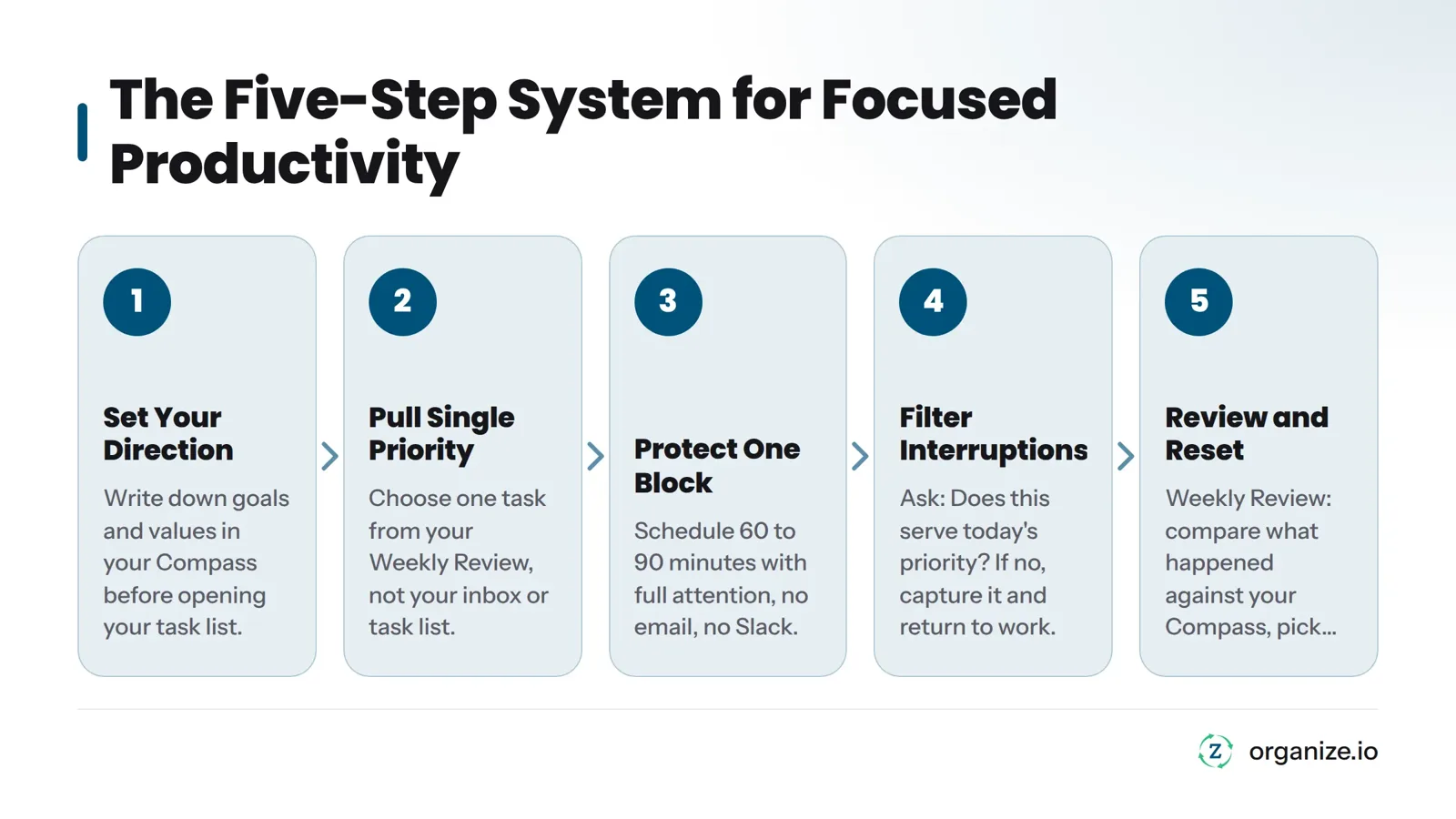
A focus block is a defined chunk of time - usually 60 to 90 minutes - where you work on nothing but your single priority. No email tab open. No Slack. No “quick checks.” One task, one block, full attention.
Focus Block Basics: Pick a time when your energy is naturally higher. Close everything unrelated to the single priority. Tell your team you’re unavailable for that window. Treat the block like a meeting with yourself that you cannot reschedule for anyone but your most important client.
Without a protected block, your single priority competes with everything else for scraps of attention, and it loses.
This is the step almost every competing guide skips, and it’s the one that actually saves your day.
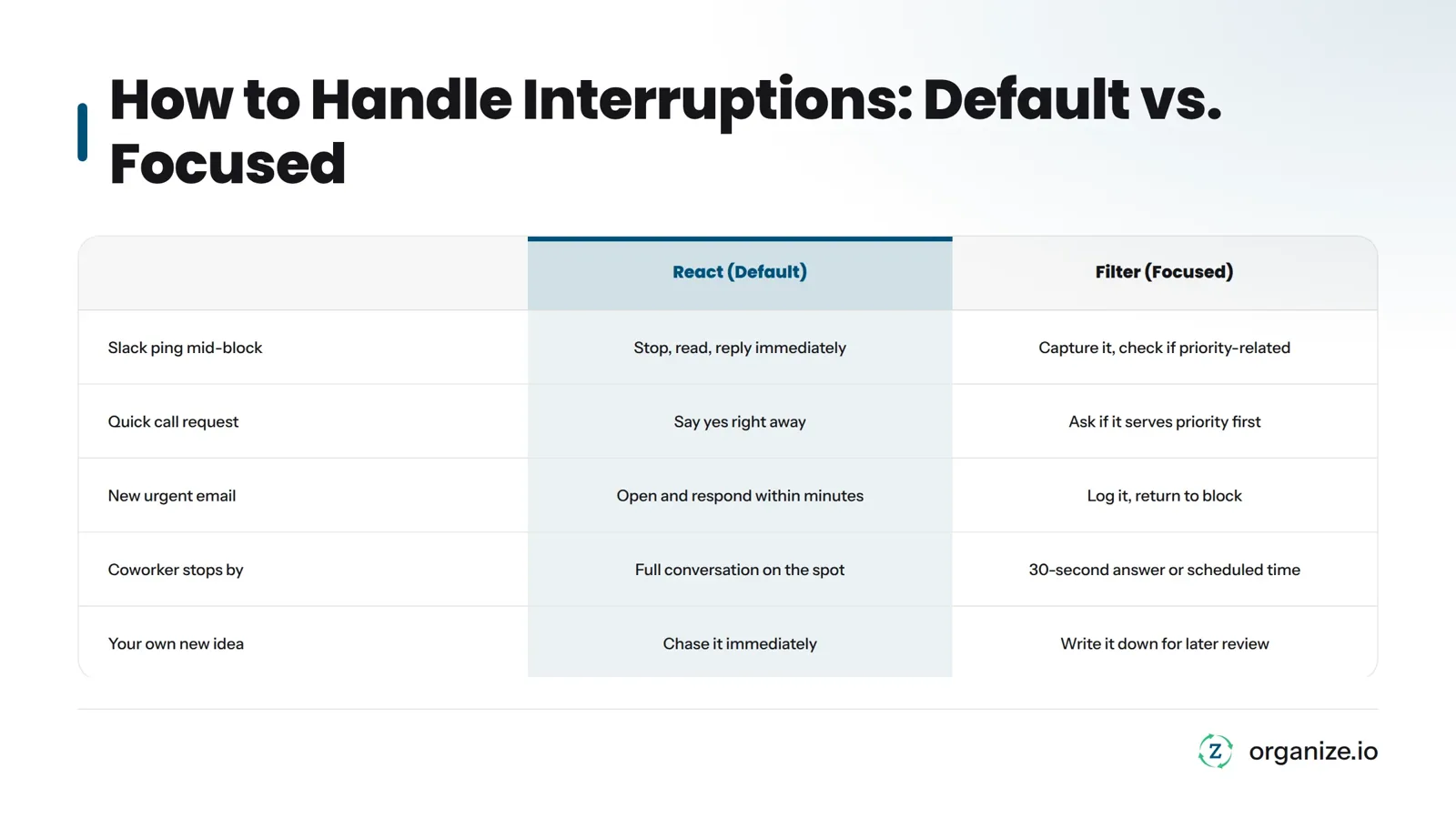
When an interruption arrives, ask one question: does this serve today’s single priority? If yes, handle it. If no, capture it somewhere - a notes app, a list, whatever you use - and get back to the block. Don’t act on it right now. Don’t even fully think about it right now. Write it down and move on.
This single rule does more for your focus than any app, timer, or mantra. It turns a vague feeling of “I should stay focused” into a concrete decision you can make in two seconds every single time something pulls at your attention.
Here’s what that looks like in practice:
| Situation | React (default behavior) | Filter (direction-first behavior) |
|---|---|---|
| Slack ping mid-focus-block | Stop, read, reply immediately | Check against single priority. Not related? Capture it, keep working. |
| “Can you hop on a quick call?” | Say yes right away to avoid seeming unhelpful | Ask if it serves today’s priority. If not, offer a specific time later. |
| New “urgent” email | Open and respond within minutes | Glance at sender and subject only. Log it. Return to the block. |
| A coworker stops by your desk | Full conversation on the spot | Give a 30-second answer or a scheduled time, then return to the block. |
| Your own new idea mid-task | Chase it immediately | Write it in a notes list for later review. Stay on the current task. |
This is single-tasking in practice. You’re not trying to ignore the world. You’re making sure the world doesn’t get to decide your priorities for you, one ping at a time. Context switching has a real cost in lost momentum every time you jump between unrelated tasks, which is exactly why this filter matters more than raw willpower.
Focus doesn’t stay fixed once you find it. Interruptions pile up, priorities shift, and some weeks just go sideways. That’s normal. The fix isn’t trying harder tomorrow. It’s resetting on a schedule.
The Weekly Review is where that reset happens. Once a week, you look back at what actually got done, compare it against your Compass, and pick the next single priority with a clear head instead of a reactive one. This is also where you clear out the captured interruptions from Step 4 and decide which ones, if any, actually deserve a spot on next week’s plan.
If you lose an entire day, or even a full week, to firefighting, the Weekly Review is your way back. You don’t need to “catch up” on everything. You need one clean reset and a new single priority to build the next week around.
Most focus problems aren’t dramatic. They’re small habits that quietly undo the whole system.
If any of these sound familiar, you’re not alone. Almost every hard worker falls into at least one of them, usually because no one ever gave them a clear rule for when to say no to an interruption.
Write down your single priority for tomorrow before you go to bed tonight, based on what actually matters this week, not what’s sitting unread in your inbox. That’s the whole system in miniature.
If you want to run this daily, a structured Daily Action Plan walks you through building one around a single priority instead of a long list. The daily planning questions guide is a practical next step if you want a short daily checklist.
Once the single-priority habit is working, two related concepts are worth exploring: deep work, which covers the quality of attention inside your focus block, and the Pomodoro technique, a way to structure time inside that block. Both work best once direction-first prioritization is already in place. Without that, you’re just doing 25-minute sprints on the wrong task.
For a broader look at why most productivity tools fail to create focused productivity, this breakdown of productivity systems beyond planning apps connects the dots between tool-hopping and the direction problem.
Dan Martell’s video below covers a similar direction-first mindset for getting more done without burning out, and it pairs well with the steps above.
What is focused productivity? Focused productivity is spending your work time on the one task that serves your goals, chosen from a clear direction, instead of reacting to whatever task list item or interruption shows up next.
How is focused productivity different from being busy? Being busy means your time is full. Being focused means your time went toward something that actually matters. You can be completely busy all day and never touch your real priority.
Why do I lose focus even when I have a to-do list? A to-do list records everything you could do, but it doesn’t rank anything by importance. Without a filter tied to your actual goals, every item looks equally urgent, so your attention keeps jumping around.
How do I pick one priority when everything feels urgent? Pull it from a Weekly Review, not from your inbox. Step back once a week, check your goals, and decide what matters most for the week ahead. Each day, choose your single priority from that list, not from whatever arrived overnight.
What should I do with interruptions I can’t ignore? Ask if the interruption serves today’s single priority. If it doesn’t, capture it in a notes list and return to your focus block. Deal with captured items during a scheduled break or at your next Weekly Review, not the moment they arrive.
How often should I reset my focus? Weekly. A short Weekly Review keeps your single priority aligned with your actual direction and gives you a clean way to recover from a bad day or a chaotic week without trying to “catch up” on everything at once.
Can focused productivity work if my job is reactive by nature? Yes, though the shape changes. In reactive roles like customer support or management, your single priority might be a standard you hold - response quality, team support - rather than one task. The filter still applies: when something new arrives, you check it against that standard before reacting on autopilot.
Related: Zorga productivity system, why productivity doesn’t always bring success
Goal Setting November 10, 2026
Working harder isn't working. Learn the three hidden failure points—direction, action, feedback—that separate busy effort from real success.
Goal Setting November 1, 2026
Willpower runs out, but systems don't. Learn the 4-pillar framework behind productivity tips that hold up under real pressure, not just in January.

Goal Setting October 26, 2026
What is personal growth, really? Discover its true meaning, how it differs from self-improvement, and the five key areas to focus on in 2026.