
Goal Setting November 10, 2026
Productivity and Success: Why Busy Isn't Getting You Ahead
Working harder isn't working. Learn the three hidden failure points—direction, action, feedback—that separate busy effort from real success.
Goal Setting 22 min read
Personal vs. team goal tracking software compared for 2026, with a 6-question framework to pick the right tool and stop quitting after week three.
Most people looking for goal tracking software have already failed with one. They downloaded a habit app in January, built a streak for three weeks, then missed a Tuesday and never opened it again. Or they built a spreadsheet with quarterly plans they haven’t touched since March. The problem usually isn’t discipline. It’s that the software tracked numbers without ever showing why those numbers mattered.
Goal tracking software is any tool that helps you set a goal, break it into measurable steps, and log progress over time. But the category splits into two completely different paths: personal tools for individuals chasing fitness, finances, or life goals, and team tools built around OKRs (Objectives and Key Results) for companies trying to align departments. Picking the wrong path is the first reason people quit. Picking the right tool without a system behind it is the second.
This guide splits those two paths clearly, gives you a real framework for choosing, and names the tools worth your money in 2026, including where they fall short. I’ll walk through why most goal software gets abandoned within weeks, backed by actual behavioral research, not vendor benchmarks designed to sell you something.
Goal tracking software is a digital tool that lets you define a goal, break it into trackable milestones or key results, and record progress on a regular schedule. At its core, it does three things: it stores your goal, it gives you a way to log movement toward it, and it shows you a visual of how far you’ve come. The better tools connect that progress to your daily actions, so the goal isn’t just a number sitting in an app you forget to open.
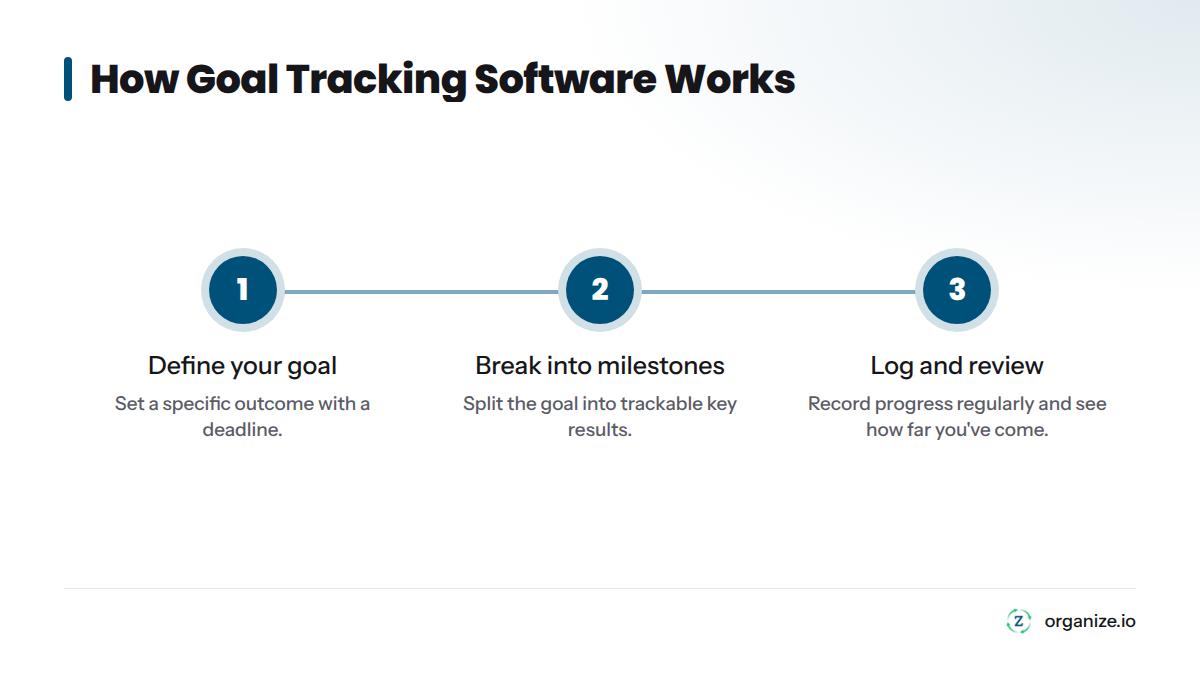
The category covers a wide range of uses. A founder tracking monthly revenue against a 12-month target is using goal tracking software. So is someone logging a 5K training plan, a couple saving for a house down payment, or a VP of Sales rolling up quarterly OKRs across six regional teams. The tools differ, but the mechanism is the same: define it, break it down, log it, review it.
These three categories overlap but solve different problems.
| Category | What it tracks | Best for | Example |
|---|---|---|---|
| Goal tracker | A specific outcome with a deadline (lose 20 lbs, save $10,000, launch a product) | Individuals or teams with a defined finish line | Save $15,000 for a down payment by December |
| Habit tracker | A recurring daily or weekly behavior, with no fixed end date | Building consistency in a routine | Meditate 10 minutes every morning |
| OKR software | Company or team objectives broken into measurable key results, reviewed on a cadence | Businesses aligning multiple people around shared priorities | Increase quarterly revenue 15% through three key results |
A goal tracker answers “did I hit the number.” A habit tracker answers “did I show up today.” OKR software answers “is the whole team moving the same direction.” Some tools, including Zorga, blend goal tracking and habit tracking into one system because in real life, your daily habits are usually what gets you to the goal. If you want to understand habit tracking specifically, our breakdown of the best habit tracking apps covers that in more depth.
Answer one question before you look at a single app: are you tracking something for yourself, or for a team? That single choice determines almost everything else about which tool fits.
Personal goal tracking software is built around a single user’s life: fitness, finances, relationships, personal projects, career moves. It tends to be visual, flexible, and tied to daily habits. Team or OKR goal tracking software is built around alignment: making sure a sales team, a product team, and a marketing team are all rowing toward the same quarterly number, with check-ins and dashboards leadership can review.
If you’re a solo founder, freelancer, or someone working on personal development, you want the personal category. If you manage a team of five or more and need visibility into everyone’s progress against shared objectives, you want the OKR category. Forcing a personal tool to run team OKRs, or vice versa, is one of the most common reasons people switch tools three times before finding one that works.
Quick decision checklist:
Here’s the uncomfortable truth nobody selling goal software wants to say out loud: most people who download a goal tracking app stop using it within a few weeks. Behavioral psychologists Edwin Locke and Gary Latham spent decades studying what drives goal achievement, and their research consistently found that specific, measurable goals paired with regular feedback outperform vague intentions by a wide margin - but only when the person stays engaged with the feedback loop (Locke & Latham, “Building a Practically Useful Theory of Goal Setting and Task Motivation,” American Psychologist). The feedback loop is the part software usually gets wrong. Most apps show you a number. They don’t show you why the number matters or what to do next.
A progress bar without a reason behind it is just a number. If you set a goal to save $15,000 but never connect it to why - a home down payment, leaving a job you hate, funding a business - the first time saving gets hard, there’s nothing pulling you back to the app. This is the single biggest gap I see in most goal tracking software, and it’s the reason I built Zorga’s Compass feature the way I did: you define your direction and values first, and every goal and daily action ties back to that, instead of sitting in an app as an isolated checkbox.
I’ve built and sold a company before building Zorga, and the pattern I saw in myself and in every team I managed was the same. People don’t fail because they lack a tracking tool. They fail because the tool never reminds them what they’re actually working toward. A dashboard full of green checkmarks means nothing if you’ve forgotten why you started. That’s covered in more depth in why productivity apps fail when you lack direction, which gets into the mechanics of this problem beyond goal tracking specifically.
Every single person using goal tracking software eventually misses a day, a week, or a month. What separates people who recover from people who quit entirely is whether the system has a built-in way to get back on track, or whether it just shows you a broken streak and leaves you to figure it out. Most apps do the latter. A missed day becomes a missed week becomes a deleted app.
The fix isn’t willpower. It’s a process. A short weekly review that asks “what happened, what do I adjust, what’s the next small step” does more to prevent abandonment than any streak counter. If you’ve already fallen off and need a concrete way back in, this guide to getting back on track walks through the exact process.
This section covers tools built for individuals, not teams. Each takes a different approach, so match it to your actual habits, not just the feature list.
Zorga is a direction-first personal effectiveness system, not a task manager with a goals tab bolted on. You start in the Compass, where you define your values and long-term vision before setting a single goal. From there, goals break down into a Daily Action Plan, so every day you see the two or three actions that actually move a goal forward, instead of a generic to-do list. The Weekly Review walks you through what worked, what didn’t, and what to adjust, which directly addresses the recovery problem most goal apps ignore. An AI Coach checks in on your progress and flags when a goal has gone quiet. Focus Sessions help you actually execute the actions you’ve planned instead of just listing them.
For a full comparison with more personal goal tracking apps, our dedicated review of the best goal tracking apps goes deeper on individual feature sets.
Strides is a long-running iOS goal and habit tracker that supports four goal types: target, habit, average, and project. It’s popular for its flexibility in how you measure progress.
GoalsOnTrack is a web-based tool built around the SMART goals framework, with milestone tracking, journaling, and a vision board feature.
Habitica turns goals and habits into a role-playing game. You earn experience points and gold for completing tasks and lose health for missing them.
Way of Life is a minimalist habit and goal tracker that uses a simple yes/no/skip logging system with color-coded chains.
TickTick is primarily a to-do list app with added habit tracking and calendar features.
Personal goal tracking software comparison:
| Tool | Best For | Pricing Model | Platforms | Standout Feature | Limitation |
|---|---|---|---|---|---|
| Zorga | People who’ve failed with other apps and want direction + daily action in one system | Subscription or one-time lifetime payment | Web, iOS, Android | Compass direction-setting tied to daily actions and Weekly Review | More setup time upfront |
| Strides | iPhone users wanting flexible goal types | Free + subscription | iOS only | Four goal measurement formats | No Android, no direction-setting |
| GoalsOnTrack | SMART-goal planners who want one-time pricing | One-time payment available | Web | SMART goal templates + vision board | Dated interface |
| Habitica | Gamification-motivated users | Free + optional subscription | Web, iOS, Android | RPG-style motivation system | Game layer can distract from real goals |
| Way of Life | Minimalist daily check-ins | Free + paid upgrade | iOS, Android | Habit correlation reports | No milestone or long-term goal planning |
| TickTick | Task-list users wanting basic habit tracking | Free + subscription | Web, iOS, Android, desktop | Combined tasks, habits, calendar | Goal tracking is secondary to task management |
If you’re managing a team and need everyone aligned around shared quarterly objectives, this is a different category entirely. These tools are built for check-ins, dashboards, and cross-team visibility, not personal habit formation.
Asana is a project management platform with a Goals feature that lets you connect team objectives to the actual project work driving them.
Weekdone is a dedicated OKR platform built around weekly check-ins and a simple traffic-light progress system.
Tability is an OKR tool built around AI-assisted check-ins that try to reduce the admin work of updating goals every week.
Lattice combines OKR tracking with performance management, making it a fit for HR-driven goal programs tied to reviews.
Perdoo is a dedicated OKR platform with strong goal-cascading features for aligning objectives across departments.
Workboard is an enterprise OKR platform aimed at large organizations needing structured goal alignment and executive reporting.
Team and OKR goal tracking software comparison:
| Tool | Best For | Pricing Model | Team Size Fit | Standout Feature | Limitation |
|---|---|---|---|---|---|
| Asana | Teams wanting goals tied to project work | Free + paid tiers | Small to large | Goal-to-project linking | Full goals feature needs paid tier |
| Weekdone | Teams new to OKRs | Free + subscription | Small to mid-size | Simple weekly check-in cadence | Less depth for complex cascades |
| Tability | Teams wanting low-admin OKR tracking | Free + paid tiers | Small to mid-size | AI-assisted check-ins | Smaller track record |
| Lattice | HR-driven goal + performance programs | Per-employee subscription | Mid-size to large | OKRs tied to performance reviews | Expensive if you only need OKRs |
| Perdoo | Multi-department goal alignment | Subscription, tiered | Mid-size to large | Goal cascading across departments | Steep learning curve for small teams |
| Workboard | Enterprise executive reporting | Enterprise subscription | Large enterprise | Executive-level rollups | Not built for individuals or small teams |
If you’re running a small business and trying to decide whether you need a full OKR platform or something lighter, our guide to business productivity software covers how to think about that decision before you commit budget to an enterprise tool.
This video from ClickUp walks through a side-by-side comparison of several personal and team goal tracking apps if you want a visual tour before deciding:
If you’re not ready to pay for anything yet, these free options are genuinely usable, with real limitations you should know about going in.
The honest take: free tiers are fine for testing whether you’ll actually use a daily or weekly tracking habit before you spend money. They’re rarely enough for someone serious about a 6-to-12-month goal, because the features that make a tool sticky usually sit behind the paywall.
Almost every competitor list skips this math, but it matters more than any feature comparison. A $9.99/month subscription feels cheap in isolation. Over three years, it adds up to real money, and you own nothing at the end of it.
| Pricing model | Example tool | Monthly equivalent | 1-year cost | 3-year cost |
|---|---|---|---|---|
| One-time payment | GoalsOnTrack (lifetime tier) | N/A | One-time fee, no recurring cost | Same one-time fee |
| One-time payment | Zorga (lifetime option) | N/A | One-time fee, no recurring cost | Same one-time fee |
| Low-cost subscription | Way of Life, TickTick premium | $2-4/month | $24-48 | $72-144 |
| Mid-range subscription | Strides, Habitica subscription | $5-10/month | $60-120 | $180-360 |
| Team OKR subscription | Weekdone, Tability (small team) | $50-100/month for a small team | $600-1,200 | $1,800-3,600 |
| Enterprise OKR subscription | Lattice, Workboard | Custom, often $1,000+/month | $12,000+ | $36,000+ |
The math makes the decision clear. If you’re an individual planning to use a goal tracking tool for more than two years, a one-time payment option saves real money compared to paying monthly indefinitely. That’s why Zorga offers a lifetime payment option alongside its subscription: paying once and being done with it is a better deal for most personal users than an endless monthly charge, and it’s backed by a 90-day money-back guarantee if it’s not the right fit.
Buying the right tool solves maybe a third of the problem. The rest comes down to how you set it up and whether you build a review habit around it.
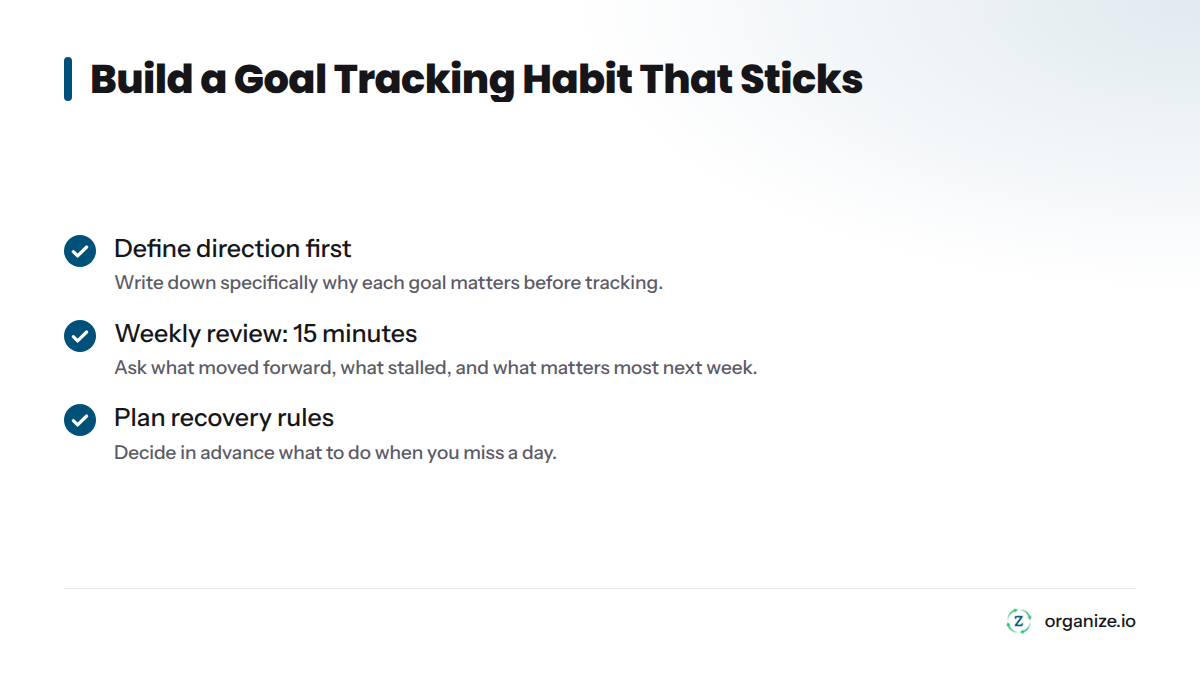
Before you type a single goal into any app, write down why it matters. Not a vague sentence, something specific: “I’m tracking this revenue goal because I want to leave my job by next March” or “I’m tracking this fitness goal because I want to keep up with my kids without getting winded.” That sentence becomes your anchor when motivation dips. If the tool you’re using has a place for this, like Zorga’s Compass, use it. If it doesn’t, write it somewhere you’ll see it every time you log progress. Our guide to question-based goal setting walks through a more detailed version of this process if you want to go deeper before you start.
Pick one day a week, 15 minutes, no exceptions. Ask three questions: What moved forward this week? What stalled? What’s the one action that matters most next week? This single habit does more to keep a goal alive than any app feature. Most people who abandon goal tracking software never built this review cadence in the first place. They just expected the app to remind them on its own.
Decide in advance what you’ll do when you miss a day, because you will. A pre-built recovery rule removes the emotional decision in the moment. Something like: “If I miss a day, I review why, adjust the next action if needed, and continue the next day without starting over.” Apps that reset your streak to zero and offer nothing else make this harder than it needs to be. If you’re mid-setback right now, this practical guide to getting back on track gives you the exact steps instead of generic encouragement.
5-step setup checklist for any goal tracking tool:
This short video covers a similar approach to tracking goals day to day, including journal setups worth borrowing regardless of which app you choose:
What is the best app to track my goals? There’s no single best app for everyone. The best personal option depends on whether you want a simple habit-style tracker (Way of Life), a gamified experience (Habitica), or a full system that ties goals to daily actions and a weekly review (Zorga). The best team option depends on company size: Weekdone for small teams new to OKRs, Lattice or Workboard for larger organizations.
What is the best goal planner? A good goal planner, whether digital or paper, does three things: breaks a big goal into measurable milestones, prompts regular review, and connects daily actions back to the goal. GoalsOnTrack and Zorga both build this structure in directly, rather than leaving you to build your own system in a blank notebook.
How do I keep track of my goals? Pick one tool, not four. Write down why each goal matters before tracking the number. Break it into milestones with dates. Schedule a 15-minute weekly review to check progress and adjust. Define 1-2 daily actions tied to each goal so progress happens automatically instead of requiring extra motivation each day.
What is the 5-4-3-2-1 goal method? The 5-4-3-2-1 method is a goal-setting framework where you identify 5 long-term goals, break each into 4 mid-term milestones, 3 action steps per milestone, 2 habits that support the actions, and 1 daily priority that ties directly back to the top goal. It’s a structure for cascading a big goal down into something you can actually do today, similar in spirit to how OKRs cascade company objectives down to individual tasks.
Is there free goal tracking software that actually works? Yes, with caveats. Habitica, Way of Life, and TickTick all have usable free tiers for basic habit and goal tracking. They work well for testing whether you’ll stick with a tracking habit at all. They typically cap the number of goals you can track or limit review and reporting features, so serious long-term use usually requires upgrading.
What’s the difference between goal tracking software and a habit tracker? Goal tracking software tracks progress toward a specific outcome with an end point, like saving $10,000 or launching a product. A habit tracker tracks a recurring behavior with no fixed finish line, like meditating daily or drinking more water. Many people need both, which is why some tools, including Zorga, combine goal tracking and habit tracking into one system instead of forcing you to run two separate apps.
Can one app handle both personal and professional goals? Yes, if the app is built to separate goal categories clearly. Zorga, for example, lets you track a career goal, a fitness goal, and a financial goal side by side, each connected to its own daily actions, within one Dashboard. Most dedicated OKR tools are built only for team/company goals and aren’t designed for personal life goals at all, so check whether a tool explicitly supports both before assuming it does.
Is goal tracking software worth paying for? For most people, yes, if the tool actually changes behavior rather than just logging numbers. Research on goal-setting consistently shows that specific, measurable goals with regular feedback outperform vague intentions (Locke & Latham, American Psychologist), and a paid tool with built-in review structure gives you that feedback loop automatically. A free tier is worth trying first, but don’t expect it to carry you through a 12-month goal without some limitation showing up.
If you’re managing a team around quarterly objectives, start with Weekdone if your team is new to OKRs, or Lattice if you want goals tied into performance reviews. If you’re an individual who just wants a simple daily habit log, Way of Life or Habitica will do the job without overcomplicating things.
If you’re the person this article was really written for - someone who has already tried a habit app, a planner, maybe a notebook system, and none of it stuck past a few weeks - the issue probably isn’t the checklist. It’s that none of those tools ever connected your daily actions back to a defined direction. That’s the specific gap Zorga was built to close, with a Compass to define your direction, a Daily Action Plan to turn it into daily steps, and a Weekly Review to keep you honest and help you recover when you fall behind. It comes with a 90-day money-back guarantee and both subscription and one-time payment options, so you can try the system without locking into a long-term cost before you know it works for you.
Whatever you choose, the tool matters less than the review habit you build around it. Pick one system, give it a real 90 days, and judge it by whether you’re still using it in week twelve, not week one.
Goal Setting November 10, 2026
Working harder isn't working. Learn the three hidden failure points—direction, action, feedback—that separate busy effort from real success.
Goal Setting November 7, 2026
Stop reacting to your inbox. Learn the 3-step method to set direction, pick one priority, and protect a focus block that actually moves goals forward.
Goal Setting November 1, 2026
Willpower runs out, but systems don't. Learn the 4-pillar framework behind productivity tips that hold up under real pressure, not just in January.