

Goal Setting November 10, 2026
Productivity and Success: Why Busy Isn't Getting You Ahead
Working harder isn't working. Learn the three hidden failure points—direction, action, feedback—that separate busy effort from real success.
Goal Setting 16 min read
Learn the 7-step process to build an action plan that works, with templates, examples, and a recovery plan for when you fall behind.
Most people fail at goals not because they lack ambition, but because they never convert the goal into a sequence of actions they can do on a Tuesday morning. That gap between “I want to lose 20 pounds” or “I want to grow revenue 30%” and the next concrete task is where most plans die silently.
An action plan closes that gap. It’s the operational bridge between a goal and the daily work that gets you there. I built and exited a company, and the single biggest difference between initiatives that shipped and ones that fizzled wasn’t talent or funding. It was whether someone wrote down exactly what needed to happen, who would do it, and when, then checked it every week.
This guide gives you a complete 7-step process for building an action plan, worked examples you can copy, a template, and something almost nobody addresses: what to do when your plan stalls - because it will. That last part matters more than the plan itself.
An action plan is a written document that breaks a goal into specific tasks, assigns a deadline and owner to each task, and lists the resources needed to finish them. It turns a broad intention into a sequence of concrete steps you can schedule, track, and check off.
Think of it as the operational layer between your goal and your calendar. The goal tells you where you’re headed. The action plan tells you what to do this week to get closer to it.
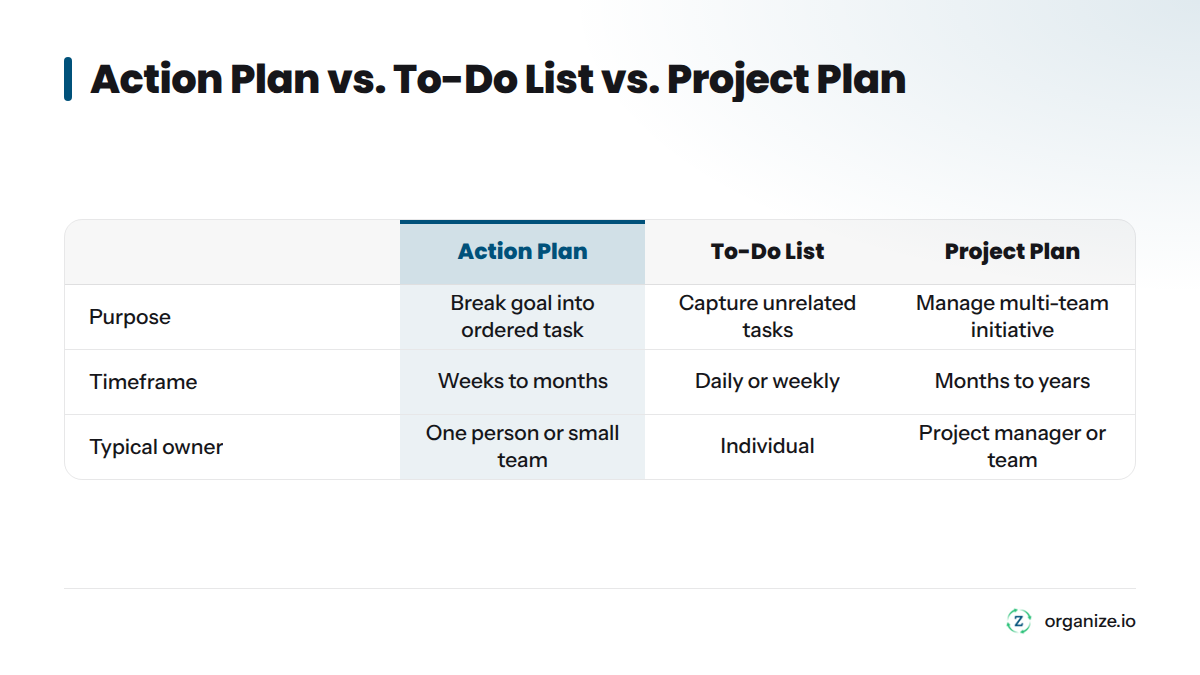
These three documents solve different problems. Knowing the distinction prevents you from building the wrong one.
| Document | Purpose | Timeframe | Typical Owner | Example |
|---|---|---|---|---|
| Action plan | Breaks one specific goal into ordered tasks, deadlines, and resources | Weeks to months | One person or small team | “Launch a freelance writing side business by Q2” |
| To-do list | Captures everything you need to do, often unrelated tasks | Daily or weekly | Individual | “Call dentist, buy groceries, reply to email” |
| Project plan | Manages a larger, often multi-team initiative with dependencies and budget | Months to years | Project manager or team | “Build and launch a new product line” |
A to-do list has no connection to a bigger goal. A project plan is an action plan’s larger, more formal cousin, built for organizational work with multiple contributors, budgets, and dependencies. An action plan sits between: focused enough for one goal, structured enough to actually finish it.
Here’s what nobody tells you: the plan usually isn’t the problem. The system around the plan is.
Three things kill action plans before they get a fair shot:
The goal underneath the plan is vague. You can’t build a task list from “get healthier” or “grow the business.” Vague goals produce vague action plans, and vague action plans produce zero completed tasks.
The plan has no owner for daily execution. A document in a drawer or a Google Doc doesn’t do anything. Someone has to look at it and act on it every single day, or at minimum every week.
There’s no plan for falling behind. Life happens. Deadlines slip. If your only plan is “stick to the schedule perfectly,” one bad week sends the whole thing to the trash.
This is why a goal has to come before the plan, and a daily system has to come after it. We start every plan with a Compass step - a short exercise that forces clarity on direction before a single task gets written. Most productivity tools skip this and hand you a task list with no direction, which is a big reason productivity apps fail in the first place.
Follow these steps in order. You’ll end with a usable plan, not just a list of good intentions.
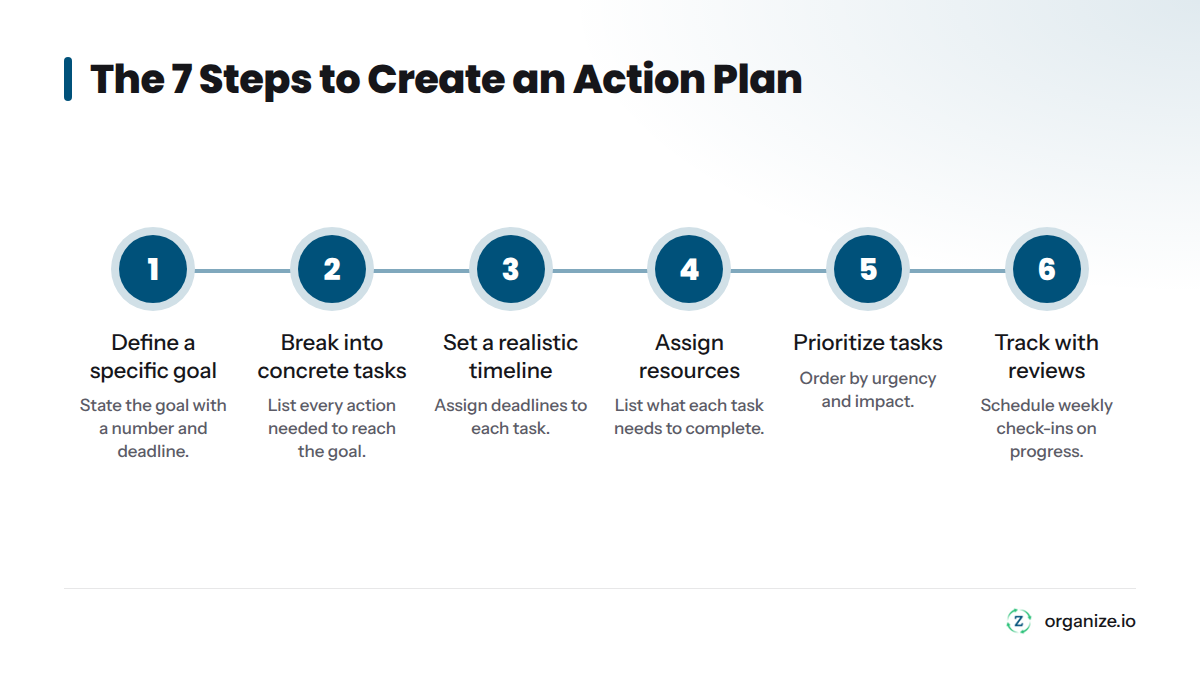
Start with one goal stated in a way you can measure, with a deadline attached. “Increase monthly sales by 15% by March 31” works. “Sell more” doesn’t.
The SMART framework is the fastest way to pressure-test a goal before you build a plan. SMART stands for Specific, Measurable, Achievable, Relevant, and Time-bound. Run your goal through all five filters:
Research on goal-setting theory by psychologists Edwin Locke and Gary Latham, summarized through the American Psychological Association, found that specific, challenging goals lead to higher performance than vague “do your best” goals in 90% of studies. Specificity isn’t optional. It’s the single biggest lever you have before you write a single task.
Take your one goal and list every task required to reach it, written as actions, not ideas. “Research three CRM options” is a task. “Improve customer management” is not.
Work backward from the goal. Ask: “What has to be true right before I hit this goal?” Then keep asking that question for each answer until you reach tasks small enough to finish in a single sitting, usually 30 minutes to a few hours.
For a personal finance goal like “save $5,000 in 12 months,” your task breakdown might look like:
Assign a deadline to every task, not just the overall goal, and work backward from your end date to figure out when each task needs to start.
A goal with a single far-off deadline and no interim milestones is a trap. You’ll feel fine for weeks, then panic in the final stretch. Instead, break the timeline into checkpoints:
| Milestone | What’s True by This Point | Target Date |
|---|---|---|
| 25% mark | Core setup tasks complete | Week 3 |
| 50% mark | Halfway to the measurable target | Week 6 |
| 75% mark | Most execution done, reviewing results | Week 9 |
| 100% | Goal achieved, plan closed out | Week 12 |
A 90-day window works well for most goals because it’s long enough to see real progress but short enough to stay urgent.
For every task, name the person responsible (even if it’s just you) and list what they need to complete it: money, time, tools, or help from someone else.
This step gets skipped constantly on personal action plans because people assume “I’ll just do it.” But naming the resource forces you to notice gaps early. If a task needs $200 you don’t have budgeted, you want to know that in week one, not week eight.
For work or business plans, this step prevents the classic failure where three people assume someone else owns a task and nobody does it. Every task needs exactly one owner, even on a two-person team.
Not every task on your list deserves equal attention right now. Use a simple decision framework to decide what to do first: sort tasks by urgency and impact, then start with what’s both urgent and high-impact.
A quick way to sort any task list is the urgent/important matrix:
| Urgent | Not Urgent | |
|---|---|---|
| Important | Do first | Schedule it |
| Not important | Delegate or batch | Cut it |
If a task isn’t urgent or important, it shouldn’t be on this week’s list at all, even if it’s technically part of the plan.
Pick one recurring check-in - weekly works best for most goals - where you look at the plan, mark what’s done, and adjust what’s next. Without this step, even a great plan goes stale within two weeks.
The format doesn’t need to be complicated. A basic weekly review answers three questions:
This is the step every competitor guide skips, and it’s the one that matters most. It’s the difference between people who finish what they start and people who abandon plans by week three.
Decide in advance what you’ll do when a task slips, because it will. A recovery plan is just a pre-written answer to “what happens when I miss a deadline,” so you don’t have to make that decision emotionally in the moment.
Falling behind doesn’t mean the plan failed. It means you’re human. Build a simple rule: if a task is more than one review cycle late, you either reschedule it with a new deadline, break it into a smaller task, or cut it if it’s no longer relevant. Write that rule into the plan itself, right next to the timeline.
This single built-in rule beats an entire motivational chapter about willpower.
Seeing a finished plan makes everything above click. Here are three worked examples across the contexts people search for most.
Goal: Run a 10K race in under 60 minutes within 16 weeks.
| Task | Owner | Deadline | Resource Needed | Status |
|---|---|---|---|---|
| Buy proper running shoes | Me | Week 1 | $120 budget | Done |
| Follow a 16-week training plan | Me | Weeks 1-16 | Running app or printed plan | In progress |
| Run 3x per week minimum | Me | Ongoing | 30-45 min, 3x/week | In progress |
| Complete a practice 10K at week 12 | Me | Week 12 | Local 10K route | Not started |
| Race day | Me | Week 16 | Registration fee | Not started |
Goal: Launch a new onboarding process for new hires by end of quarter.
| Task | Owner | Deadline | Resource Needed | Status |
|---|---|---|---|---|
| Audit current onboarding gaps | HR Lead | Week 1 | 3 hours, access to exit interviews | Done |
| Draft new onboarding checklist | HR Lead | Week 2 | Template, manager input | In progress |
| Get manager sign-off | Dept Heads | Week 3 | 30-min review meeting | Not started |
| Build onboarding materials | HR Coordinator | Week 5 | Design tool, content writer | Not started |
| Pilot with next 2 new hires | HR Lead | Week 8 | 2 incoming hires | Not started |
| Review and finalize | HR Lead | Week 12 | Feedback from pilot | Not started |
Goal: Increase monthly recurring revenue by 15% in 90 days.
| Task | Owner | Deadline | Resource Needed | Status |
|---|---|---|---|---|
| Identify top 3 churn reasons | Founder | Week 2 | Customer exit survey | Done |
| Launch win-back email campaign | Marketing | Week 4 | Email tool, $0 budget | In progress |
| Test a new pricing tier | Founder | Week 6 | Pricing page update | Not started |
| Reach out to 20 lapsed customers | Sales | Week 8 | CRM list, 10 hrs | Not started |
| Review MRR against target | Founder | Week 12 | Revenue dashboard | Not started |
Notice the pattern across all three. Every row has a goal-aligned task, exactly one owner, a real deadline, a named resource, and a status you update weekly. That’s the anatomy of a working action plan.
Use this checklist to build your own plan from scratch. Copy it into a doc, spreadsheet, or your planning tool of choice.
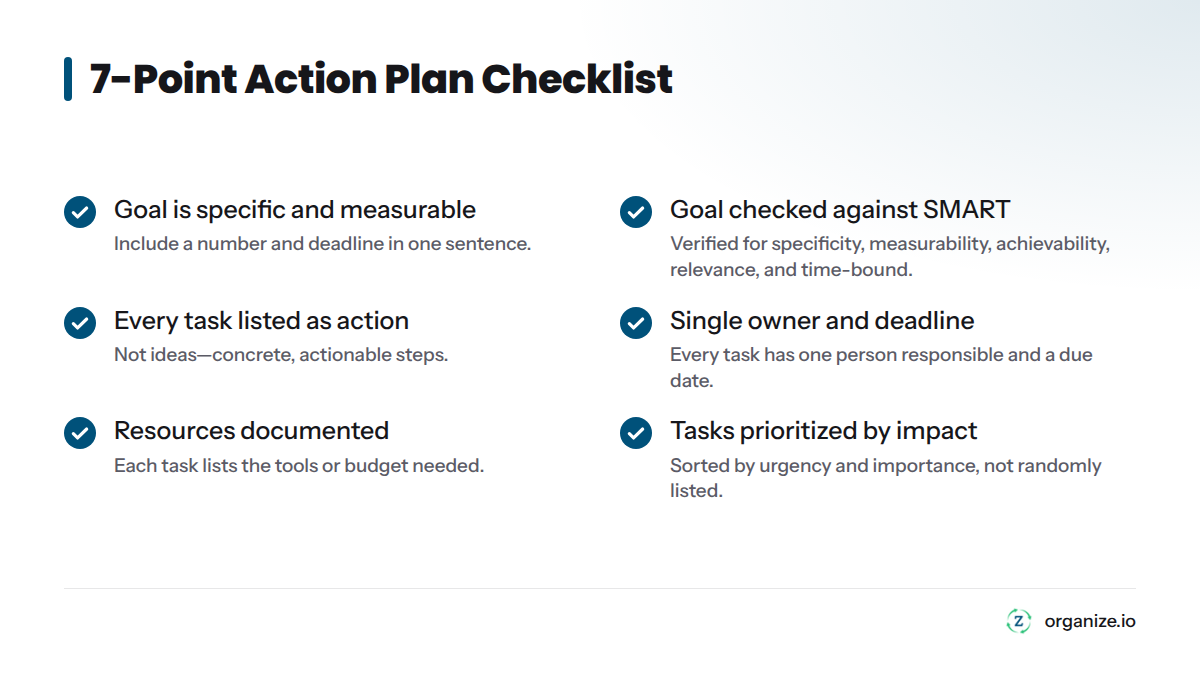
7-Point Action Plan Checklist:
Template columns: Goal, Task, Owner, Deadline, Resource, Status. That’s it. Anything more complicated usually doesn’t survive past week two.
A static template gets you started. Whether it keeps working depends on whether you ever open it again after day one.
| Approach | Best For | Strength | Weakness |
|---|---|---|---|
| Zorga (Daily Action Plan + Weekly Review) | Anyone who wants goals connected to daily tasks automatically | Links your Compass direction, Daily Action Plan, and Weekly Review in one system, plus an AI Coach that nudges follow-through | Requires setup time upfront, like any real system |
| Spreadsheet or paper template | Simple, short-term personal goals | Free, fast to start | No reminders, easy to forget, no built-in review habit |
| Asana | Teams managing multiple projects with dependencies | Strong for team task assignment and tracking | Built for team project management, not personal goal-to-action connection |
| Lucidchart | Visualizing a plan as a flowchart or diagram | Good for mapping dependencies visually | Not built for daily task tracking or reminders |
Here’s the honest tradeoff. A template is a snapshot. A system is a loop. The Zorga system connects the plan you wrote in week one to what shows up on your Dashboard in week eight. The Daily Brief pulls your top tasks forward automatically, so you’re not relying on memory or a browser bookmark to a doc you forgot about.
Writing the plan is the easy 20%. Here’s what keeps it running:
Here’s a short video that walks through a similar step-by-step build process if you want to see it taught a different way.
Most failed plans share the same handful of mistakes. Watch for these:
| Mistake | Why It Fails | Fix |
|---|---|---|
| Goal is too vague to measure | Can’t tell if you’re making progress | Rewrite with a number and a deadline (SMART) |
| Tasks are too big | A task like “launch website” never feels done | Break into 2-3 hour chunks |
| No single owner per task | Everyone assumes someone else is handling it | Name one person per task, even solo plans |
| No scheduled review | Plan gets written once, never reopened | Put a recurring review on the calendar |
| No recovery rule | One missed deadline derails the whole plan | Write the “what happens if I miss this” rule in advance |
| Plan lives separately from daily work | You forget it exists by week two | Connect it to a daily system, not just a stored document |
| Too many goals in one plan | Attention splits, nothing gets finished | One action plan per goal, run them in parallel if needed |
How do I write an action plan?
Start with one specific, measurable goal and a deadline. Break it into individual tasks, assign an owner and deadline to each task, list the resources each task needs, prioritize by urgency and impact, then schedule a recurring weekly review to track progress and adjust.
What is the best format for an action plan?
A simple table with six columns works for almost any goal: Goal, Task, Owner, Deadline, Resource, Status. Whether that table lives in a spreadsheet, a document, or a connected system like Zorga’s Daily Action Plan matters less than whether you actually open it every week.
What are the 5 steps of an action plan?
Some guides condense the process into 5 steps: set a SMART goal, list the actions needed, set a timeline, assign resources, and monitor progress. The 7-step version here adds two steps most short lists skip: prioritizing tasks with a decision framework, and building in a recovery plan for when you fall behind.
What is an example of an action plan?
A basic example: Goal: “Save $5,000 in 12 months.” Task: “Open high-yield savings account” (Owner: you, Deadline: week 1). Task: “Set up automatic $417 monthly transfer” (Owner: you, Deadline: week 1). Task: “Review savings progress” (Owner: you, Deadline: monthly). See the full worked examples above for personal, work, and business contexts.
How long should an action plan be?
Length depends on the goal, not a fixed page count. A personal goal might fit on one page with 5-10 tasks. A business initiative might run several pages with 20-30 tasks across multiple owners. The test isn’t length, it’s whether every task has an owner, deadline, and resource attached.
What’s the difference between an action plan and a goal?
A goal is the destination: “Increase sales 15% by March.” An action plan is the route: the specific tasks, deadlines, and resources required to get there. You need both. A goal without a plan is a wish. A plan without a goal is just busywork.
Can an action plan be used for personal goals, not just work?
Yes. The same 7-step process applies whether you’re planning a fitness goal, a career change, a home project, or a business launch. The structure doesn’t change, only the specific tasks and resources do.
How often should I review my action plan?
Weekly is the sweet spot for most goals. Daily is too frequent to see meaningful progress on most tasks, and monthly is too infrequent to catch a stalled plan before it fully derails. A short weekly review, even 10 minutes, keeps the plan connected to your actual week.
Building the plan is step one. Showing up to it on a normal Tuesday three weeks in, when the motivation that wrote the plan has already faded, is the real test. That’s the part worth building a system around.
Goal Setting November 10, 2026
Working harder isn't working. Learn the three hidden failure points—direction, action, feedback—that separate busy effort from real success.

Goal Setting November 7, 2026
Stop reacting to your inbox. Learn the 3-step method to set direction, pick one priority, and protect a focus block that actually moves goals forward.
Goal Setting November 1, 2026
Willpower runs out, but systems don't. Learn the 4-pillar framework behind productivity tips that hold up under real pressure, not just in January.